
Shift time in Moodle with one click.
Manage open, close dates, restrictions, and visibility of all your course activities in bulk. Ideal for migrating courses to new semesters.
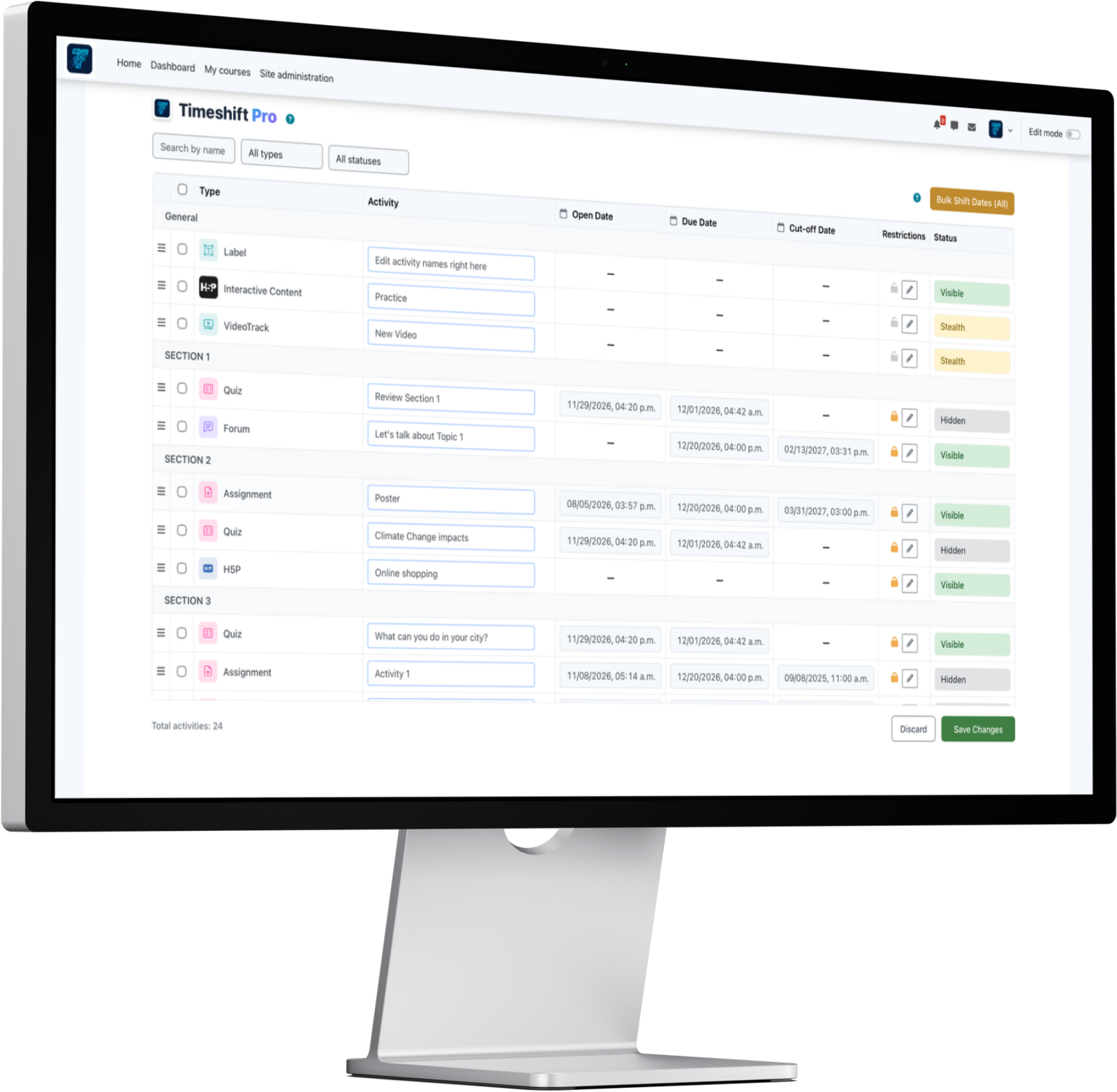
Designed for Productivity
Forget editing activity by activity. TimeShift Pro saves you hours of configuration.
Bulk Shift
Shift due, start, and close dates of all your activities or specific selections forward or backward in seconds.
Find and Replace
Find and modify text in the names of all activities. Perfect for updating years ("Exam 2026" to "Exam 2027").
Availability Management
Change visibility status, stealth mode, or hide dozens of activities quickly.
Restrictions Control
Assign or remove access restrictions in bulk with an intuitive, centralized menu.
Secure Deletion
Select and delete activities in bulk with security confirmation to prevent accidental data loss.
Drag and Drop
Reorder activities within your sections and topics using a modern Drag & Drop interface.
Choose your Ideal Plan
Flexible options tailored to your educational institution's size.
Free Plan
Ideal for individual teachers.
- View and manage Quiz, Assign & Forum dates
- Rename activities directly from the table
- Find & Replace in activity names
- Calendar date synchronization
- Modify dates in Bulk across activities
- Shift ALL course dates by X days automatically
- View and organize by course sections
- Delete activities in bulk
- Filter activities by type or status
- Manage ALL modules (Files, Pages, Books, etc.)
- Change Availability (Show, Hide, Stealth mode)
- Manage Access Restrictions & Conditions
- Drag and drop reordering inside the table
- Premium Support
Pro Plan
Ideal for single institutions.
- View and manage Quiz, Assign & Forum dates
- Rename activities directly from the table
- Find & Replace in activity names
- Calendar date synchronization
- Modify dates in Bulk across activities
- Shift ALL course dates by X days automatically
- View and organize by course sections
- Delete activities in bulk
- Filter activities by type or status
- Manage ALL modules (Files, Pages, Books, etc.)
- Change Availability (Show, Hide, Stealth mode)
- Manage Access Restrictions & Conditions
- Drag and drop reordering inside the table
- Premium Support
Agency Plan
Ideal for agencies and multiple sites.
- License for 5 installations
- All Pro features
- Receive state-of-the-art support from our team!
- Early Updates
Frequently Asked Questions
Everything you need to know about TimeShift Pro.
Yes, TimeShift Pro is compatible with Moodle 4.1 up to 5.2.
You select the activities and specify the number of days to shift (e.g., +120 days). The plugin automatically recalculates and updates the open, close, and due dates without messing up your workflow.
Activities are permanently deleted along with their grades and student submissions. We highly recommend using the visibility toggle instead if you want to keep the historical records.
Absolutely! You can upgrade from the Free or Pro plan to the Agency plan at any time right from your account dashboard.
Your plugin will remain fully functional without any interruptions. However, an active subscription is required to access premium support and receive software updates, including new features and compatibility patches.
Ready to optimize your courses?
Join hundreds of Moodle administrators and teachers who have already automated their workflow.
Get TimeShift Pro